

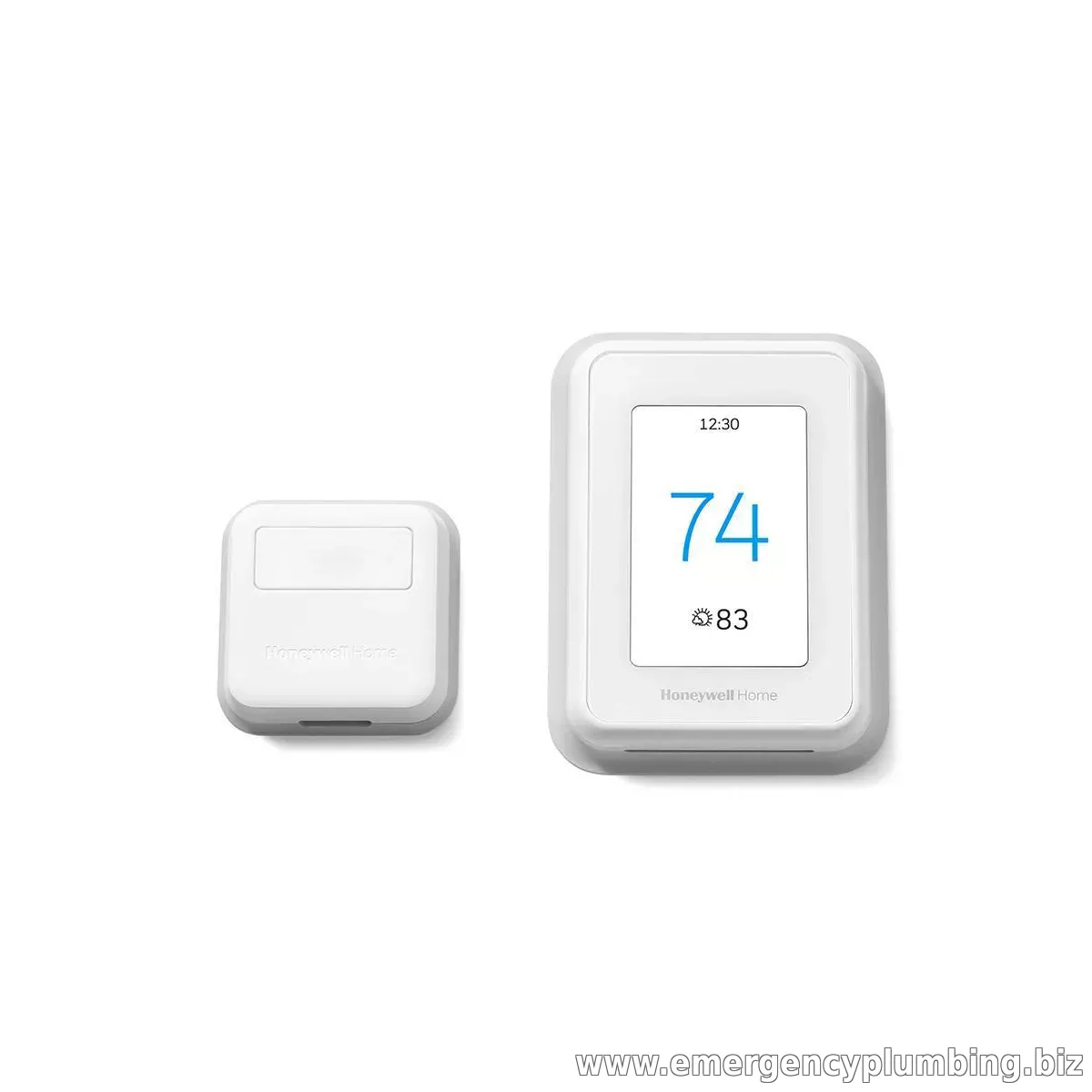
Honeywell T9
Highlights
-
Welcome to ‘just right’ - Sense the temperatures in the rooms that matter. Focus on the rooms you choose by setting a schedule.
-
Focus on rooms people are in - Let the sensors focus on rooms people are in, using motion detection. Stay cozy as you move room to room.
-
Help everyone sleep comfortably - Set your T9 to sense the temperature from the bedrooms at night, to keep those rooms the coolest and help everyone get a cozy night's sleep.
-
Auto Home and Away Mode - Using location-based geofencing, the T9 can sense when everyone’s out of the house, adjusting temperatures to help you save energy.
-
Simple install for a DIY project - The T9 will self-configure to your wiring, guiding you through a simple setup with no c-wire required.
-
Control it your way - Control the T9 using the Honeywell Home app or through Amazon Alexa, Google Assistant, Microsoft Cortana, and more.
-
Multi-room focus - Focused on multiple rooms, the T9 will work towards creating an average temperature across the sensors.
-
Easy-to-use app - The Honeywell Home app gives you access to control your WiFi thermostat anytime, anywhere.
-
Smart alerts help you worry less - Know if temperatures go below your threshold, and when to change your air filter.
-
Sensors that work with your movement - Motion detection that knows the difference between passing through a room or spending time there.
-
Monthly Energy Reports - Track your heating and cooling trends and get tips on reducing energy use.
-
Efficiency and rewards - The T9 works with utility programs across the US to bring you even more savings.
-
More insights about your home - Each sensor will report on temperature and humidity, all within the Honeywell Home app.
-
Description
The T9 Smart Thermostat works with Smart Room Sensors to help you adjust the temperature from anywhere and stay cozy in the rooms that matter. Place sensors where you want to see each room's temperature and humidity. Use the multi-room display on the thermostat's touchscreen — or in the Honeywell Home app — to focus on rooms based on occupancy or a specific schedule you choose. When focusing on multiple rooms, the T9 works toward creating an average temperature, balancing the needs across the whole home.
Understanding Room Sensor Technology: Why It Matters
The Problem with Single-Point Thermostats
A traditional thermostat only measures temperature at one fixed location — usually a hallway or central spot in the home. That single reading often doesn't reflect what's actually happening in the rooms people spend the most time in, leading to bedrooms that feel too warm, home offices that run cold, or living rooms that never quite match the thermostat's setting. The T9's Smart Room Sensors solve this by measuring temperature and humidity directly in the rooms that matter most, then using that data — rather than a single hallway reading — to control your system.
Motion Detection: More Than Just On/Off
The T9's sensors don't simply detect presence or absence — they distinguish between someone briefly passing through a room and someone actually spending time there. This means the system can intelligently shift its focus toward occupied spaces throughout the day without being fooled by someone walking past on their way elsewhere.
Everyday Scenarios Where This Helps
- Bedtime comfort — set the T9 to prioritize bedroom sensors at night, helping maintain a cooler, more sleep-friendly temperature where you need it most, regardless of what the rest of the house reads
- Work-from-home setups — keep a home office comfortable during the day without overcooling or overheating unused rooms
- Multi-story homes — balance temperature differences between floors that naturally run warmer or cooler
- Away-from-home savings — geofencing automatically detects when everyone has left and adjusts temperatures to reduce energy use, then restores comfort settings as you return
Installation: What to Know Before You Buy
- No C-wire required — the T9 is designed to self-configure to most home wiring setups, though a C-wire adapter is included for systems that need one
- Not compatible with electric baseboard heating systems — an important consideration if your home uses baseboard heat rather than forced-air or heat pump systems
- Snap-on wall mount — if you're replacing another Honeywell T-Series thermostat, the shared mounting plate can simplify installation
Smart Home and App Integration
The T9 connects via Wi-Fi to the Honeywell Home app, giving you remote access and control from anywhere. It also integrates with Amazon Alexa, Google Assistant, and other major smart home platforms, so it can fit into an existing smart home setup rather than requiring a standalone app.
Energy Tracking and Utility Rewards
Beyond comfort, the T9 provides monthly energy reports that show your heating and cooling trends over time, along with practical suggestions for reducing energy use. In many utility service areas, connecting your Honeywell Home account to a local efficiency program can also make you eligible for seasonal energy-saving rewards — worth checking with your utility provider after installation.
How Many Sensors Do You Need?
The T9 supports multiple room sensors, allowing it to average conditions across several priority rooms rather than relying on just one. Most single-family homes benefit from placing sensors in 2–3 key rooms — commonly bedrooms and a main living area — though the ideal number depends on your home's layout and which rooms matter most to your comfort.
Professional Installation Matters
While the T9 is designed for DIY installation, our technicians can ensure:
- Your HVAC system's wiring is fully compatible before installation begins
- Sensor placement is optimized for accurate room-by-room readings
- Wi-Fi connectivity and app setup are completed and tested
- Existing zoning, humidification, or ventilation equipment integrates correctly with the new thermostat
Frequently Asked Questions
Can the T9 replace my old Honeywell thermostat directly?
If you currently have a Honeywell T-Series thermostat, your existing wiring is often already compatible, and the T9 can typically snap onto the same wall plate.
Does it work with heat pump systems as well as furnaces?
Yes, though you should confirm your specific HVAC configuration is supported before installation — our technicians can verify compatibility as part of the installation process.
How does geofencing know when I've left home?
The Honeywell Home app uses your smartphone's location (with permission) to detect when everyone in the household has left the geofenced area around your home, then automatically adjusts the thermostat to an energy-saving mode.
Room-by-Room Comfort, Smart Sensors & Effortless Energy Savings
The Honeywell Home T9 Smart Thermostat is a premier connected climate control solution designed to eliminate hot and cold spots throughout your home. Unlike traditional thermostats that only measure temperature in the hallway where they are mounted, the T9 supports wireless Smart Room Sensors placed in the bedrooms, living spaces, or upstairs areas that matter most. You can prioritize comfort in specific rooms based on occupancy or time of day, while Geofencing technology automatically adjusts temperatures when you leave to save on monthly energy bills. Call our certified HVAC specialists at (224) 754-1984 for expert thermostat installation, C-wire setup, or smart home integration:
Wireless Smart Room Sensors: Place remote sensors up to 200 feet away to monitor temperature, humidity, and occupancy across multiple rooms simultaneously.
Priority Room Scheduling: Set your system to focus comfort on the family room during the day and your master bedroom at night automatically.
Geofencing & Smart Scheduling: Uses your smartphone's location to track when you're away and save energy, returning to your ideal comfort setting right before you arrive home.
Clear Touchscreen & Mobile App Control: Features a vibrant, high-definition color display and intuitive control via the Resideo / Honeywell Home smartphone app from anywhere.
Full Smart Home Ecosystem Compatibility: Integrates seamlessly with Amazon Alexa, Google Assistant, Apple HomeKit, and smart home automation routines.
Honeywell T9 Smart Thermostat Technical Specifications & Features
Designed for clean wall mounting on standard low-voltage HVAC wiring:
Technical Parameter Feature & Specification Details Operational Advantage Manufacturer & Model Honeywell Home T9 Smart Thermostat Premium connected comfort control for residential HVAC systems. Sensor Capability Supports up to 20 Smart Room Sensors Extended multi-room temperature and humidity monitoring. HVAC Compatibility Conventional (up to 3H/2C) & Heat Pumps (up to 4H/2C with aux) Versatile support for gas furnaces, heat pumps, boilers, and AC units. Connectivity & App 2.4 GHz & 5 GHz Wi-Fi / Resideo App Dual-band Wi-Fi connectivity with instant mobile push alerts. Power Requirements 24 VAC Power (C-Wire Required) Reliable continuous power without internal battery drain issues. Display & Interface Full-Color Touchscreen Display with Auto-Dimming Clear, modern visual interface showing indoor temperature and weather.
Key Benefits of Upgrading to a Honeywell T9 Smart Thermostat
Upgrading your home with a Honeywell T9 thermostat delivers immediate improvements in daily comfort and energy efficiency:
Eliminates Multi-Level Temperature Discrepancies: Upstairs bedrooms and finished basements finally match your desired temperature by routing sensor priority directly to those spaces.
Lowers Monthly Utility Bills: Smart scheduling and geofencing ensure you never waste energy heating or cooling an empty house.
Protects Your HVAC Equipment: Sends alerts for extreme indoor temperatures, filter replacement reminders, and high humidity warnings directly to your phone.
Sleek, Modern Aesthetics: The minimalist, low-profile design complements any modern home interior décor.
Our Step-by-Step Honeywell T9 Installation Process
HVAC Wiring & C-Wire Inspection: Verifying existing low-voltage transformer wiring and ensuring a dedicated common (C-wire) is present for reliable power.
Wall Plate Mounting & Leveling: Securing the T9 wall mounting plate cleanly over paint lines and leveling the unit for a pristine finish.
Terminal Connection & Power Verification: Fastening heating, cooling, fan, and staging wires into the secure push terminals and powering up the system.
Wi-Fi Pairing & Smart Room Sensor Placement: Connecting the thermostat to your home Wi-Fi network and strategically placing remote room sensors in target living areas.
App Configuration & Temperature Scheduling: Setting up the Resideo mobile app, defining comfort schedules, and verifying responsive multi-stage heating/cooling calls.
Frequently Asked Questions: Honeywell T9 Smart Thermostat
Q: Does the Honeywell T9 require a C-wire (common wire) to operate?
A: Yes. The T9 requires a steady 24VAC common wire (C-wire) to power its color touchscreen display and Wi-Fi radio. If your existing setup lacks a C-wire, our technicians can easily install a power adapter or run a new wire during installation.
Q: Can I control the temperature based on specific rooms rather than just the hallway?
A: Yes. That is the main feature of the T9. By placing Smart Room Sensors in different rooms, you can tell the thermostat to average the temperatures or focus entirely on the room where you are currently located.
Q: What heating and cooling systems are compatible with the T9?
A: The T9 works with conventional gas, oil, or electric heating and cooling systems (up to 3 stages of heat and 2 stages of cool) as well as heat pumps with auxiliary heat.
Q: Are there any monthly subscription fees to use the T9 app?
A: No. The Resideo / Honeywell Home mobile app is completely free to download and use with zero monthly subscription fees for remote access, alerts, and scheduling.
With multiple locations throughout North Shore and Northwest suburbs of Chicago, Illinois, Emergency Plumbing offers promt and professional plumbing services.
Are you looking for a reliable plumber near me in the Arlington Heights, Bannockburn, Barrington, or surrounding areas?
Our local plumbing company offers expert services, catering to all your needs. Whether you're in the heart of Buffalo Grove, the serene streets of Deerfield, or require an emergency plumber in Des Plaines or Elk Grove Village, we are here to help. Our plumbing contractors are well-versed in the unique plumbing systems of Glencoe, Glenview, Hawthorn Woods, and Highland Park.
For those in Highwood, Hoffman Estates, or the quaint town of India Creek, our team guarantees prompt and efficient service.
Residents of Inverness, Kildeer, Lake Bluff, Lake Forest, and Lake Zurich can also rely on our expertise. We extend our services to Long Grove, Mettawa, Lincolnshire, Mount Prospect, Mundelein, Northbrook, and Palatine.
Need a plumber in Prospect Heights, Ravinia, RiverWoods, Rolling Meadows, Vernon Hills, Wauconda, Wheeling, Wilmette, or Winnetka? Look no further! As a trusted plumbing contractor, we ensure that your plumbing issues are solved quickly and efficiently, keeping your home or business running smoothly.